For directors · 4 videos · 20 min
Homebook for directors
Videos for directors and office staff: set your school up first, then the day-to-day, then the admin side and privacy requests.
Start here · Getting started3:11
Part 1 · Daily use7:09
Part 2 · Setup & admin8:09
New since this video: a class you no longer use can be archived instead of deleted. In More → Classes, open the class with Edit and choose Archive class. It leaves class lists, roll calls, the gradebook menu and the family portal; every grade, attendance mark and class list stays, and report cards print as before. Bring it back any time under Archived classes → Restore.
Privacy requests and holds1:15
Recorded in our demo school. None of these are real children. Click a chapter to jump to it.
What you’ll learn
Start here · Getting started
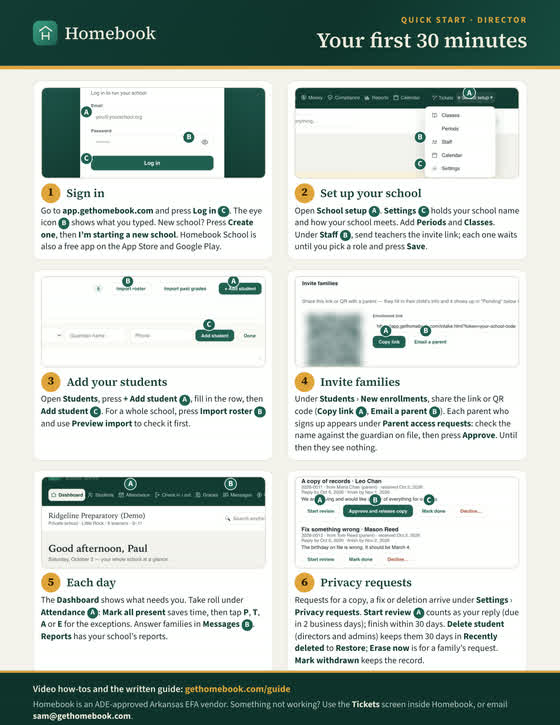
- Create your school, choose your plan and set the basics
- Invite your staff
- Add students one at a time or by importing a roster
- Invite families
- Find your Arkansas EFA dates
Part 1 · Daily use
- Read the dashboard and act on what needs a hand
- Get your monthly summary (if your school has it on)
- Catch classes whose roll wasn’t taken
- Answer family messages
- Run attendance reports, including perfect attendance
- Log discipline and send the restorative reset letter
- Work the ticket queue
Part 2 · Setup & admin
- Add students, families and staff
- Withdraw or delete a student, and restore it within 30 days
- Approve time off and track staff hours
- Set up the calendar and no-school days
- Run tuition, lunch and fees, and the front desk sign-in screen
- Print report cards
- Track Arkansas EFA deadlines and annual assessments
Privacy requests and holds
- Reply to a family’s privacy request under Settings
- Place and lift a keep-until hold so a record can’t be deleted
Run your school on Homebook
Try the live demo as a director, no call needed. Founding schools keep their pricing for as long as their subscription stays active, and Sam moves your data for you.